I am a software developer, rather than reinventing the wheel, invest on components developed by other developers.
On September 10, 2017 I ordered a component from Guangmingsoft.net. They claim to have an excellent support but that did not fan out to be true. All I needed was a registration code to prevent the component from popping up the registration requirement. After over a week of waiting, I did not receive any kind of response. I made repeated requests but did not get any response.at all. I am hoping to hear from this outfit but until then I would advise all prospective buyers to be beware of this outfit. BUYER BEWARE!!
UPDATE: The owner finally responded. His agent does have a problem communicating with him. Anyway, I got the code and everything is fine now.
Tuesday, September 19, 2017

Monday, January 2, 2017
AT&T CALL AND WEB SUPPORT SUCKS!
There are times when we fail to call forward the office number to our home phone number. As our home is far from the office I always attempt to call forward by way of managing the call forwarding through AT&T's web site. However, the feature always return an error! I attempted numerous times but unsuccessful. I tried calling tech support but the other end of the line is an automated voice recognition. I requested for a live person but to no avail. The automated responder always hang-up on me.
This kind of service by AT&T really is a turn off. I do not see any advantage using their services. I have 5 wireless phones, 3 landlines on my business. I am seriously considering canceling their services.
This kind of service by AT&T really is a turn off. I do not see any advantage using their services. I have 5 wireless phones, 3 landlines on my business. I am seriously considering canceling their services.
Thursday, May 21, 2015
Installing a device in Windows 8.1
Recently I had to transition from an old Windows XP work station to the latest Windows 8.1 system. The problem is one of the printers does not have any driver available on the manufacturers web site. The printer is an Epson LQ 590. This impact printer is not cheap and still in very good condition. I scoured the internet for a driver but it is nowhere to be found. I went ahead made the move to Win8.1, changed the parallel cable of the LQ590 to a USB and to my surprise Win8.1 supplied the driver! I tested the printer and everything worked perfectly. The next printer that needed installed is the Laserjet P2015d. I installed the win8.1 driver (supplied by HP), the printer printed but there was a problem. I get the message "Unable to communicate with the printer", and the printer is not rendering the designed forms properly. Again I scoured the internet for a solution and found none except an unanswered advise from a forum user which is to remove the printer and the installed driver, restart the system then plug in the printer. This did not work either. I guess I have to live with the message every time I print. My next project is to disable that message.
Tuesday, March 18, 2014
DJI Phantom Quadcopter Review
I finally got the DJI Phantom for my grandson's birthday. I also bought 2 extra batteries for an added flying time. With anything rotating at high speed I decided to buy him a pair of safety glasses. Before I gift-wrapped the box, I read the charging instruction and followed it to the letter. However, I did not get the correct LED indications that was supposed to be. I continued the charging for 2 hours each battery.
My grandson arrived and was very happy to open his gift. Despite the cold weather he wanted to play with the Phantom. So we did what the instructions said. The set up was easy. GPS setup was uneventful. No fussing. Of course, grandpa had to do the maiden flight. The copter was easy to control and seems to be stable in the air. After five minutes the battery was beginning to wane and not enough power to make the copter fly. Having the extra battery, we replaced the spent battery. The replacement took only 5 minutes. Same thing happened to the 3rd battery. So we went back into the house and attempted to charge the batteries. The indicators led me to conclude that it is defective. This is one of the frustrations that I get when you receive a defective item. Particularly it is worse when you ordered the items from the internet. I wrote the manufacturer regarding the item (charger) and all they did was emailed me the charge instructions. I already told them that I followed the instructions to the letter. In my disappointment, I went to my local hobby store and got an ASCEND balance charger. All I did was swapped the connectors, configured it and charged the batteries. No problem! OK, this is a message to DJI - Before shipping any item you must be sure that it passes quality control testing.
To be fair to DJI, I can say that the Phantom is well made and easy to fly. The charger is a junk!
See the the project here: "Arrowhead Court"
My grandson arrived and was very happy to open his gift. Despite the cold weather he wanted to play with the Phantom. So we did what the instructions said. The set up was easy. GPS setup was uneventful. No fussing. Of course, grandpa had to do the maiden flight. The copter was easy to control and seems to be stable in the air. After five minutes the battery was beginning to wane and not enough power to make the copter fly. Having the extra battery, we replaced the spent battery. The replacement took only 5 minutes. Same thing happened to the 3rd battery. So we went back into the house and attempted to charge the batteries. The indicators led me to conclude that it is defective. This is one of the frustrations that I get when you receive a defective item. Particularly it is worse when you ordered the items from the internet. I wrote the manufacturer regarding the item (charger) and all they did was emailed me the charge instructions. I already told them that I followed the instructions to the letter. In my disappointment, I went to my local hobby store and got an ASCEND balance charger. All I did was swapped the connectors, configured it and charged the batteries. No problem! OK, this is a message to DJI - Before shipping any item you must be sure that it passes quality control testing.
To be fair to DJI, I can say that the Phantom is well made and easy to fly. The charger is a junk!
See the the project here: "Arrowhead Court"
Friday, October 4, 2013
Evaluating Mini-SBC (Single Board Computers)
There are times when I run into an idea that requires use of inexpensive computer system. I used to go with Viatech nanosystems but they are expensive, i.e. in relation to the project budget. After some time I came across various systems like the parallax basic stamp, arduino, Raspberry Pi and Waspmote. I am currently using Arduino on a project (I will divulge this when it is done). My project with Raspberry Pi is in the back burner after I brick the unit (ouch!) when I used it to control an optorelay matrix system. The Waspmote project was a more serious project which will be pursued sometime next month. My current preference for small project is the Arduino due to the vast references available in the web. The language used is C++ which is my second programming language. Using the Raspberry Pi is for the more high-end project. Thanks for Raspbian(linux variant), I am able to utilize my expertise in Pascal, my choice for application programming. The Waspmote is similar to Arduino but a little more sophisticated in terms of wireless and sensor control. It uses C++ as development language.
Overall, my SBC preference is interchangeable and project dependent.
Overall, my SBC preference is interchangeable and project dependent.
Wednesday, August 21, 2013
Control your household lamps and your garage doors via the internet
There are times we forget to turn off the lights when we leave the house, or worse, we left the garage door open! Sure we can automate the lights on/off but that leaves control over a timing device without the satisfaction of a personal control. Knowing myself (a control-geek), I wanted that control and the challenge of building the system. I found this: http://connect.iobridge.com/tutorials/open-and-close-your-garage-door-over-the-internet/.
I ordered the items, hacked a few items (the garage door remote) and did a little soldering. Previously, I installed a garage-door monitoring sensor that would turn-on a lamp (by the TV) when the door is left open. The sensor triggers a code and sends it to the receiver which turns the lamp on or off. This signal can also be used to automatically send email to a recipient verifying the status of the garage door.
The camera was located in the garage but have moved it (see view on the right) facing directly to house where a full-view of the house can be seen. Camera location: the mailbox. So comes the idea to build a mailbox housing the wifi camera. Since the mailbox is about 25 yards from the house, running an electrical wire would be too expensive or too dangerous. So a 15-watt solar panel provides the charge to the 12 volt battery used to power the camera. The camera idea came to reality. See photos below.


I ordered the items, hacked a few items (the garage door remote) and did a little soldering. Previously, I installed a garage-door monitoring sensor that would turn-on a lamp (by the TV) when the door is left open. The sensor triggers a code and sends it to the receiver which turns the lamp on or off. This signal can also be used to automatically send email to a recipient verifying the status of the garage door.
The camera was located in the garage but have moved it (see view on the right) facing directly to house where a full-view of the house can be seen. Camera location: the mailbox. So comes the idea to build a mailbox housing the wifi camera. Since the mailbox is about 25 yards from the house, running an electrical wire would be too expensive or too dangerous. So a 15-watt solar panel provides the charge to the 12 volt battery used to power the camera. The camera idea came to reality. See photos below.
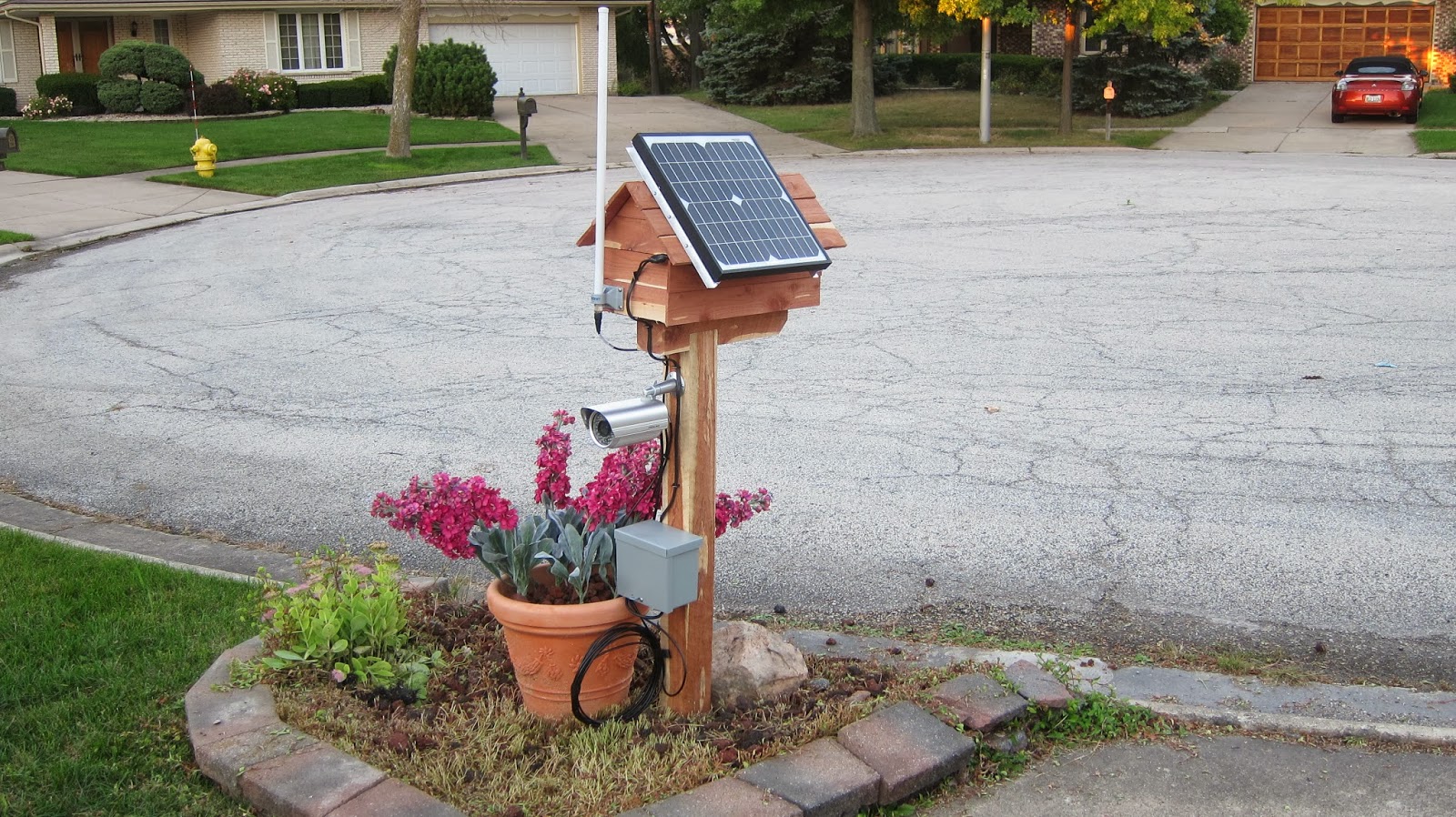
Camera located at the post of the mailbox.

View showing proximity of the mailbox to the house.
It is about 25 meters.
The battery is hidden in the flower pot.
(see image generated on the right).
Using Transcend WIFI SD Card
Recently acquired the card and as always I was excited to take it out of the package as soon as it got into my hands. The WiFi SD card is the the better answer to EYE-FI's limited memory capacity. The 32-gig is plenty for my Canon S95 which I tag along in my pocket everyday. Browsing the internet, I found that the Transcend card is running a variant linux OS with scripts written in PERL and Javascript (see links below). This is most intriguing. The Card is hackable. Being a consultant in Medical/Industrial Informatics the card could be utilized as a data server and be used for gathering data wirelessly from input devices and transferred to software applications for whatever use there may be. The WiFi card has a built in web-server and could be accessed on any PC besides the published apps for Android/IOS devices. To Connect via your PC you will need to connect your PC:
1. Turn on your WIFI-SD card equipped camera. Temporarily disable automatic shutoff of the camera.
2. (Peer-to-peer or Direct Share) With your PC connect (via wifi) to http://192.168.11.254. This is a connection directly to the wifi server of the camera. If you configure your sd-card using the internet mode (see manual below) connect to your wifi access point/router. On your phone app determine the IP Address of the camera under SETTINGS. This should be within address supplied by your router and starts with 192.168.etc.etc. Use this address in your browser.
3. The default username/password is lowercase "admin". You should now see the browser interface along with the self explanatory menu system. You should now be able to browse/download your photo/video from your camera wirelessly.
Note that when the setting is in INTERNET MODE you can upload or share the picture by using your facebook, twitter, picasa, flickr, etc. Select the appropriate upload app.
That is all there is to it.
http://haxit.blogspot.ch/2013/08/hacking-transcend-wifi-sd-cards.html
For camera applications of the Transcend WIFI-SD see:
http://www.transcend-info.com/files/Manual/WiFiSD_Manual_v1.4_EN.pdf
1. Turn on your WIFI-SD card equipped camera. Temporarily disable automatic shutoff of the camera.
2. (Peer-to-peer or Direct Share) With your PC connect (via wifi) to http://192.168.11.254. This is a connection directly to the wifi server of the camera. If you configure your sd-card using the internet mode (see manual below) connect to your wifi access point/router. On your phone app determine the IP Address of the camera under SETTINGS. This should be within address supplied by your router and starts with 192.168.etc.etc. Use this address in your browser.
3. The default username/password is lowercase "admin". You should now see the browser interface along with the self explanatory menu system. You should now be able to browse/download your photo/video from your camera wirelessly.
Note that when the setting is in INTERNET MODE you can upload or share the picture by using your facebook, twitter, picasa, flickr, etc. Select the appropriate upload app.
That is all there is to it.
Hacking the Transcend WIFI-SD
http://hackaday.com/2013/08/12/hacking-transcend-wifi-sd-cards/http://haxit.blogspot.ch/2013/08/hacking-transcend-wifi-sd-cards.html
For camera applications of the Transcend WIFI-SD see:
http://www.transcend-info.com/files/Manual/WiFiSD_Manual_v1.4_EN.pdf
Subscribe to:
Posts (Atom)